Risk Assessment Tool: Your 2026 Selection Guide
Choose the best risk assessment tool for your team. Our guide covers tool types, core features, and a practical checklist for selection.
You already know the feeling. The risk register lives in a spreadsheet. A few tabs are color coded. Ownership is half current, half outdated. One team tracks vendor risk in Excel, another logs security exceptions in Jira, and compliance keeps a separate list for audit findings. Then leadership asks a simple question: what are our top risks right now, what controls are in place, and what risk remains?
That's when the spreadsheet starts to fail.
A good risk assessment tool doesn't just store risks. It gives you a repeatable way to identify them, score them, assign treatment, and explain the leftover exposure in business terms. That matters more than ever as organizations move from ad hoc reviews to continuous oversight. It also explains why the market keeps expanding. The global Risk Assessment Tool market is projected to grow from USD 3.5 billion in 2024 to USD 7.2 billion by 2033, with 78% of enterprise adoption decisions influenced by regulatory compliance requirements, according to Verified Market Reports on the risk assessment tool market.
The hard part isn't buying software. It's picking one that fits your environment, has been validated for real use, and helps your team quantify residual risk instead of hiding it behind vague labels.
Moving Beyond Spreadsheets for Risk Management
Spreadsheets work longer than they should. That's why so many teams stick with them. They're familiar, cheap, and flexible enough to get a risk program off the ground.
They're also brittle.
A spreadsheet-based process usually breaks in the same places. Someone updates scoring logic in one tab but not another. Control owners change roles and nobody updates assignments. Evidence links go stale. A risk gets renamed in one report and duplicated in another. By the time an audit, customer questionnaire, or board review lands, the team is debating version history instead of discussing actual exposure.
Where the spreadsheet model fails
The failure isn't just administrative. It affects decisions.
When risks are scattered across files, teams can't reliably answer basic operational questions:
- What changed: New vulnerabilities, new vendors, and new control failures don't roll up cleanly.
- Who owns it: Accountability gets fuzzy when ownership is tracked in comments or side sheets.
- What matters most: Static color coding rarely survives scrutiny when executives ask why one issue outranks another.
- What happened after mitigation: Residual risk often disappears from the conversation because the sheet was built to log findings, not explain post-control exposure.
That's the tipping point where a dedicated risk assessment tool stops being a nice add-on and becomes operating infrastructure.
Practical rule: If your team spends more time reconciling risk data than reviewing risk decisions, you've already outgrown spreadsheets.
What a dedicated tool changes
A real platform centralizes the risk register, scoring method, evidence trail, corrective actions, and reporting layer. More important, it enforces consistency. The form fields, scoring logic, and workflows push users toward comparable assessments instead of one-off judgments.
That consistency matters under regulatory pressure. It also matters in daily operations. Teams need one place where security findings, control gaps, and business impacts can be translated into actions.
The point isn't to eliminate judgment. It's to stop rebuilding the process every quarter.
How Professional Risk Assessment Actually Works
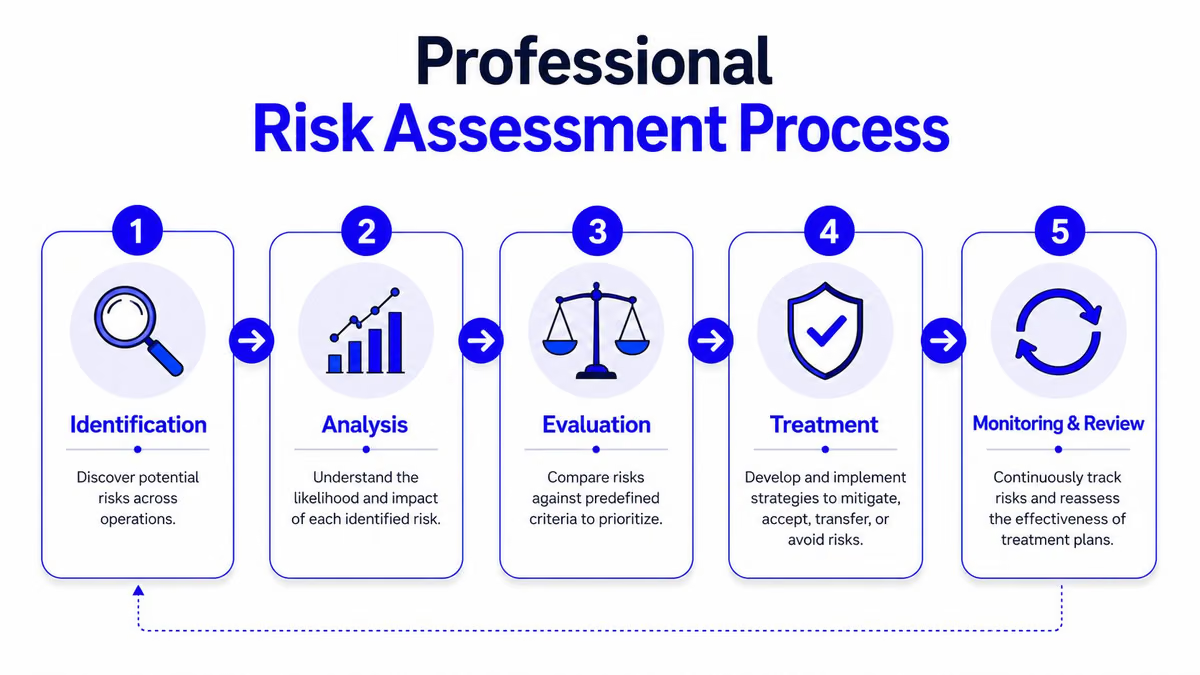
Professional risk assessment is closer to clinical diagnosis than checklist theater. A competent analyst doesn't start with a treatment. They start by identifying the problem, judging how likely it is to materialize, estimating the impact, and then deciding what response makes sense.
That's what a credible risk assessment tool should support.
The framework that matters
A credible tool should implement a six-element risk analysis framework that covers threat identification, likelihood assessment, impact evaluation, risk-level determination, documentation of assigned risk levels, and corrective actions. In many implementations, the risk level is calculated as the average of assigned likelihood and impact levels, which creates a reproducible basis for prioritization, as outlined by Compliancy Group's explanation of risk assessment tools.
In practice, that means the tool should help your team do six things well:
-
Identify threats clearly
Not “cyber risk” in the abstract. Specific threat and vulnerability pairs. An exposed admin panel. An unreviewed third-party integration. A missing backup validation process. -
Estimate likelihood
At this step, weak programs drift into opinion. A good system forces a defined scale and records why the score was chosen. -
Assess impact on the business
Impact has to mean something operational. Confidentiality, integrity, availability, financial exposure, service disruption, or compliance consequences. -
Determine risk levels consistently
The tool should calculate and display scores the same way across teams. -
Document the result
If the logic lives only in the assessor's head, it won't survive handoffs, audits, or turnover. -
Assign corrective action
Every material risk needs a treatment path, owner, and expected completion state.
What weak tools get wrong
Weak tools look polished in demos but collapse during use. They're often glorified forms with dashboards on top. They collect risks but don't structure analysis. Or they support scoring but not treatment tracking. Or they generate reports without preserving the rationale behind the score.
That's why feature lists alone are misleading. The product has to support the whole operating cycle.
A useful shortcut is to review platforms that already align risk management with automation and workflow. Lists like these AI risk management tools can help frame what modern teams expect around monitoring, prioritization, and reporting.
If the tool can't show how a score was produced, challenged, updated, and linked to corrective action, it's not mature enough for serious risk work.
A simple scoring example
A practical risk matrix plots impact and likelihood scores and produces a color-coded and numerical risk rating. In one published example, a moderate impact is assigned a numerical score of 3, then crossed with a likelihood score to derive the final rating, as shown in the HSE risk assessment guidance.
That kind of structure matters because it makes risk decisions reviewable. Without it, teams aren't assessing risk. They're just labeling concerns.
Decoding the Different Types of Risk Tools
“Risk assessment tool” is a broad label. It covers everything from lightweight matrix-based apps to enterprise GRC platforms to security products that focus almost entirely on technical exposure. If you don't separate those categories early, you'll waste time comparing products that solve different problems.
Quantitative versus qualitative
The biggest methodological split is between quantitative and qualitative tools.
Quantitative tools try to express risk in harder numbers. They're usually stronger when the organization has mature data, defined financial models, and pressure to defend prioritization with more precision. That's one reason they've gained traction in regulated environments. In 2025, Quantitative Risk Assessment held 40.3% of the market, and BFSI accounted for 34.6% of application share, according to Market.us coverage of the continuous risk assessment market.
Qualitative tools lean on structured scales such as low, medium, and high, or a matrix with defined likelihood and impact bands. They're faster to deploy and easier to socialize across engineering, product, operations, and compliance teams. The trade-off is subjectivity. If your scoring anchors are vague, different assessors will rate the same scenario differently.
Here's the practical distinction:
| Tool type | Best fit | Strength | Weak spot |
|---|---|---|---|
| Quantitative | Finance-heavy, regulated, mature programs | Defensible prioritization | Higher setup burden |
| Qualitative | Fast-moving teams, earlier-stage programs | Easier adoption | Score consistency can drift |
Enterprise GRC versus security-first tools
The next split is scope.
Enterprise GRC platforms are broad. They're designed to connect policies, controls, audits, issues, vendors, and business risks. They work well when compliance, internal audit, privacy, legal, and security need to operate in one system.
Security-focused tools are narrower and deeper. They're better at ingesting findings from scanners, cloud platforms, asset inventories, and security workflows. If your immediate pain is technical exposure rather than enterprise reporting, these often produce value faster.
For engineering-led teams, it's usually smarter to start by understanding the security tooling side. A good reference point is this roundup of vulnerability management tools for 2026, because many risk programs fail at the handoff between security findings and business-level risk decisions.
Adjacent tooling also matters
Risk programs rarely live in isolation. Legal review, vendor contracting, procurement approvals, and policy exceptions all feed risk decisions. If contract obligations are part of your control environment, it's worth looking at tools built for that adjacent workflow, such as top AI for legal agreements, because contractual blind spots often show up later as vendor or compliance risk.
The mistake I see most often is buying breadth when the team needs depth, or buying depth when leadership expects cross-functional reporting. Start with the operating problem, not the category label.
Core Features and Integrations to Demand
A team closes a vulnerability, marks the ticket resolved, and assumes the risk is handled. Three weeks later, an auditor asks who approved the exception, which control reduced the exposure, and what residual risk remains if that control fails. If the tool cannot answer that without a scavenger hunt across email, Jira, spreadsheets, and screenshots, it is not ready for production use.
The capabilities that matter
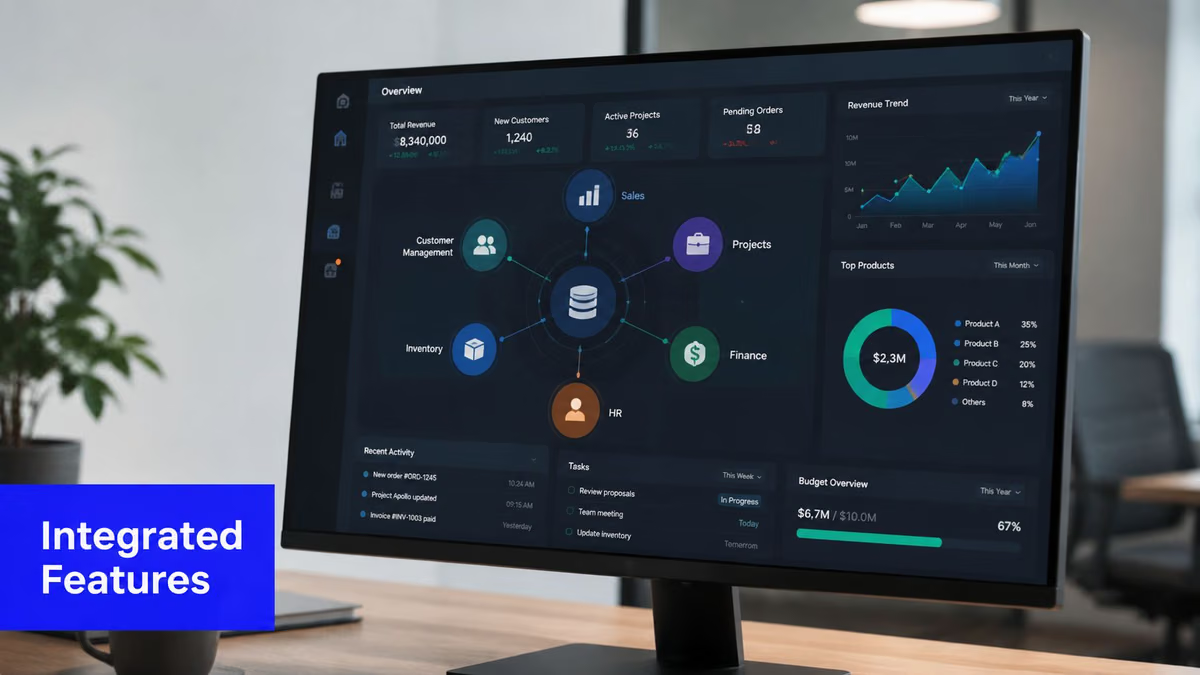
Start with a central risk register that supports decisions, not just recordkeeping. Each risk should show owner, inherent risk, control mappings, treatment status, evidence, review dates, and residual risk after controls are applied. That last piece matters more than many buyers expect. A tool that only stores raw findings will leave your team doing the hard part by hand when leadership asks, "What is still exposed after mitigation?"
A control library comes next. Good tools let one control map to multiple risks, frameworks, business processes, and tests without duplicating work. That reduces audit churn and makes change management cleaner. If a compensating control changes, you can see which risks and obligations move with it.
Then look at workflow and reporting. The trade-off here is simple. Highly configurable workflows can fit your process, but they also take longer to implement and maintain. Lighter tools are faster to launch, but they often break down when you need approval chains, exception handling, or recurring attestations. Pick based on the maturity of your process, not on how polished the dashboard looks in a demo.
Field note: The best dashboards shorten the conversation. They show what changed, what remains, who owns it, and what decision is needed.
Integrations determine whether the tool saves work or creates it
Most failed implementations I see have the same problem. The scoring model may be fine, but the data flow is weak.
For security teams, that usually means scanner feeds, cloud asset context, CMDB data, and remediation tickets. For GRC teams, it often means evidence repositories, identity platforms, policy systems, and attestation workflows. If those connections are missing, analysts spend their time copying data instead of reviewing risk.
Ownership is one of the first places this breaks. A risk record with no reliable owner becomes an orphaned record within a quarter. Integration with identity systems helps keep approvals, attestations, and review assignments current. If your environment relies on automated joiner-mover-leaver processes, it helps to understand how SCIM provisioning works, because stale roles and bad group mappings quickly turn into bad governance data.
Be careful with vendor claims around integrations. "We integrate with Jira" can mean anything from a one-way ticket push to full bidirectional sync with field mapping, status reconciliation, and audit history. Ask for the exact behavior. Ask what breaks when a field changes. Ask whether deleted assets, renamed business units, and merged tickets are handled cleanly.
What to test before signing
Do not settle for a slide deck. Have the vendor run live workflows with your use case and your terminology.
- New risk intake: Can a user create a risk quickly, with required fields, ownership, and supporting context in one pass?
- Residual risk scoring: Can the tool show inherent risk, linked controls, and the remaining exposure after those controls are considered?
- Control linkage: Can one control support multiple risks, standards, and business entities without duplicate records?
- Evidence handling: Can reviewers see proof, comments, decisions, and history in one place?
- Remediation tracking: Does the platform sync with operational systems, or does it force analysts to update the same item twice?
- Exception management: Can the team document compensating controls, approval dates, expiration, and review cadence without custom workarounds?
A short walkthrough is enough to expose weak spots. In strong products, the record stays coherent as it moves from finding to analysis to treatment to reporting. In weak ones, every handoff sheds context.
A clean interface helps. A tool earns its place when it preserves context, supports your scoring model, and makes residual risk easy to explain to the people who have to accept it.
A Practical Checklist for Selecting Your Tool
A selection process usually goes wrong before the first demo. The team asks vendors for a tour, sees polished dashboards, and starts comparing feature grids before anyone has agreed on the risk decisions the tool needs to support. That is how companies end up with software that looks mature in procurement and creates extra work six months later.
Start with the operating question
The right question is not which product has the longest feature list. It is which broken decision path needs to be fixed first.
That changes the shortlist quickly. In one environment, the problem is that security findings never get translated into business risk with an accountable owner. In another, third-party reviews stall in email and spreadsheets. In a more mature program, the gap is different. Controls are documented, but nobody can show the residual risk that remains after those controls are applied, or explain that exposure clearly enough for management to accept or reject it.
Good selection criteria are familiar. Accuracy, reliability, usability, scale, and cost all matter. The mistake is treating those as abstract buying categories instead of testing them against your context, your scoring model, and your reporting obligations.
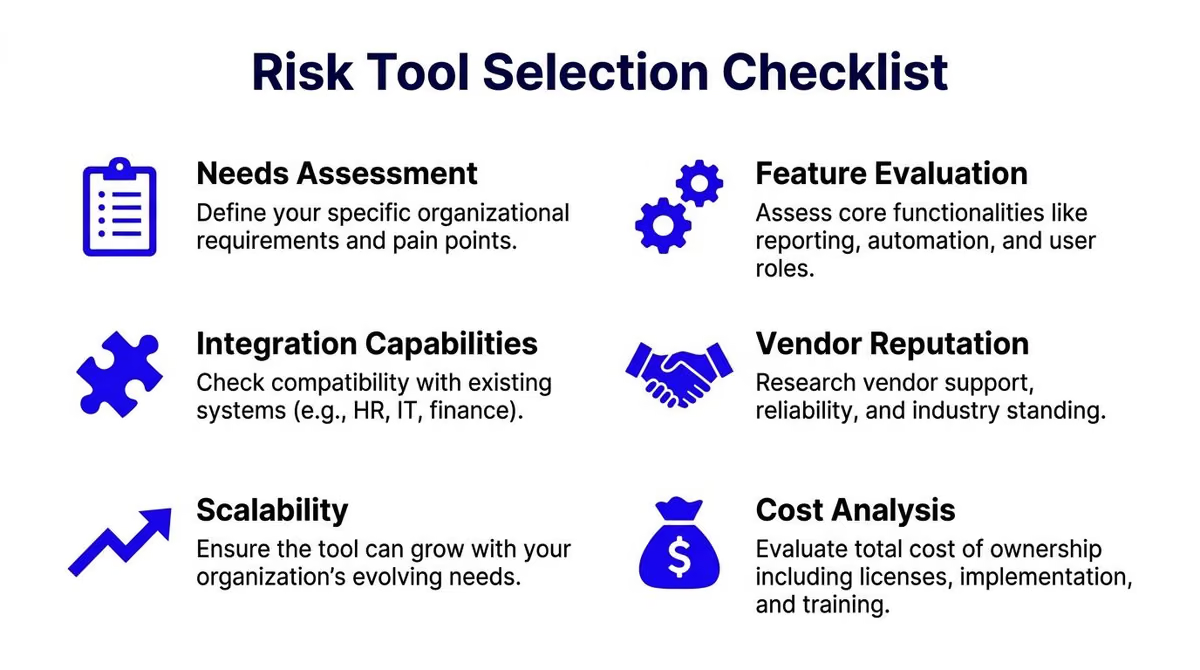
The checklist I'd use
-
Define the exact use case
Be narrow enough to test. “Enterprise risk management” is too vague to evaluate. “We need to score cloud security exceptions, link them to compensating controls, assign treatment dates, and report residual risk by business unit” gives you something a vendor can prove or fail. -
Confirm the method is credible for your environment
This matters more than flashy automation. If the tool produces scores, ratings, or prioritization outputs, ask how that model was developed, what assumptions sit behind it, and where it performs poorly. A tool that works in a generic demo can break down fast in a regulated business, a highly distributed operating model, or an environment with heavy exception handling. -
Check whether the tool has been validated for your population and workflow
“Validated” is often used loosely in sales cycles. Ask what kind of validation has been done, who performed it, and whether the context matches yours. A scoring approach calibrated for one industry, user base, or decision process can produce weak results elsewhere. If your program depends on defensible prioritization, this is not a side question. See the PMC article on risk assessment tool verification for the basic point: verification in real conditions matters more than vendor claims. -
Run a pilot with live records
Test active risks, current controls, open issues, and real owners. Include messy data. Include overdue actions. Include at least one case where a control reduces risk but does not remove it. That is where weak tools start to hide the residual exposure or force analysts into off-system work. -
Observe the work, not just the feedback
Users will often say a platform is usable because they do not want to be difficult in a review meeting. Watch them create a record, route it, update it, and prepare a report for someone who has to make a decision. Friction shows up in skipped fields, duplicate entry, side spreadsheets, and “we usually handle that in email.” -
Price the operating cost, not just the license
Cheap software gets expensive when every workflow needs services work, admin support, or custom reporting logic. Count implementation effort, scoring model maintenance, integration upkeep, training time, and the internal labor required to keep records clean enough for audit and board reporting.
Questions worth asking vendors
- What assumptions sit behind your scoring model, and how do you document them?
- Can we show inherent risk, control effect, and residual risk without custom reporting?
- How do you preserve scoring history when scales, taxonomies, or thresholds change?
- What breaks during migration, and how do you detect bad imports or duplicate records?
- How does role-based access work for control owners, reviewers, executives, and auditors?
- Where does your product need configuration or services work to support exceptions and compensating controls?
Buy for the workflow your team will follow on a busy Tuesday, not the polished process shown in a sales demo.
If you need a simple way to structure product comparisons, this guide on how to evaluate workflow fit in project management software is a useful cross-check. The category is different, but the buying discipline is the same. Define the actual work, identify adoption friction early, and make sure the tool supports the process people will use under time pressure.
The best choice often feels a little unremarkable. That is usually a good sign. It means the tool fits your operating reality, supports defensible residual risk decisions, and does not need heroics from the team to keep the process intact.
Real-World Workflows and Measuring Success
The best way to judge a risk assessment tool is to watch how it handles ordinary work. Not a tabletop exercise. Not a glossy dashboard review. Ordinary work.
Workflow one, a product team reviews a new dependency
A software team wants to add a new open-source package to speed up delivery. Security flags maintenance concerns and unclear transitive dependencies. In a mature tool, the team creates a risk record tied to the application, links the relevant control requirements, logs the business benefit, and routes the item to engineering and security owners.
That workflow matters because the answer usually isn't “block” or “approve.” It's “approve with conditions,” such as version pinning, monitoring, or compensating review steps. The tool should make that decision visible and auditable.
Workflow two, compliance tracks an audit issue to closure
A compliance lead finds that evidence for access review is inconsistent across systems. The risk tool should let them map the issue to the control, assign remediation tasks, collect updated evidence, and preserve the status trail for future audits.
Cross-functional ownership is revealed. If the platform can't connect compliance language to operational tasks, remediation drifts.
A related capability is incident linkage. When a control failure contributes to a real event, teams need to connect incidents and risks cleanly. Tools and workflows discussed in guides to incident management software often overlap here, especially when lessons learned should update control ratings or treatment plans.
Residual risk is where many programs stall
Teams commonly score inherent risk. Far fewer can explain what remains after controls are applied.
That gap is common. Data from 2024 to 2025 shows 68% of risk teams struggle to translate residual risk into actionable business decisions, and many tools still lack scoring models or visualization dashboards to support that step, according to the Medicaid risk assessment tool webinar materials.
So use a simple working method:
- Score the initial risk: Document likelihood and impact before controls.
- List the active controls: Preventive, detective, or corrective.
- Re-score with controls in place: Don't just lower the number automatically. Explain why the control changes likelihood, impact, or both.
- Record the acceptance decision: Mitigate further, accept, transfer, or avoid.
- Show the residual state visually: A matrix view or executive summary is often enough if the rationale is clear.
Residual risk isn't the risk you forgot. It's the risk you understand and have chosen to carry, within limits you can defend.
What success actually looks like
Success isn't “we bought a platform.” It's operational clarity.
A strong program can show which risks changed recently, which controls are overdue for review, where exceptions are accumulating, and which accepted risks still sit above business tolerance. In some environments, teams also apply the control hierarchy used in safety programs: eliminate the hazard first, then organizational measures, then collective protective measures, and use PPE only as the last layer, as outlined in the European Agency for Safety and Health at Work risk assessment tool.
That kind of discipline is what turns a tool into a decision system.
Your Next Step Finding the Right Tool
The right risk assessment tool won't remove uncertainty. It will make uncertainty visible, structured, and manageable. That's its core function.
Pick the product that matches your operating reality. If your challenge is technical exposure, favor stronger security integrations and remediation workflows. If your challenge is cross-functional governance, prioritize control mapping, evidence management, and executive reporting. If you can't prove the tool fits your environment or explain residual risk after controls, keep looking.
A shortlist should be built around real use cases, not category labels. Use your own data. Test ownership workflows. Force the product to show how it handles scoring changes, control updates, and accepted risk. If it does those things cleanly, the rest is detail.
The next sensible move is to compare products side by side, narrow by workflow fit, and read reviews from people who've used them in practice rather than in theory.
If you're building that shortlist now, Toolradar is a practical place to start. It helps you compare software categories, review product capabilities quickly, and cut down the time spent bouncing between vendor sites, generic directories, and sales demos.
From the team behind Toolradar
Show up when someone asks ChatGPT
ChatGPT, Claude, and Perplexity already retrieve Toolradar. We run the content that keeps you in those answers, and the 6 newsletters that put you in front of buyers directly.
See how we work- risk assessment tool
- risk management software
- cybersecurity tools
- compliance tools

Written by
Louis Corneloup
Founder & Editor-in-Chief at Toolradar. Founder & CEO of Dupple, the publisher of 6 industry newsletters reaching 950K+ tech professionals. Reviews B2B software using a public methodology, see /how-we-rate and /editorial-policy.
Related Articles
10 Best Endpoint Security Tools of 2026
Find the best endpoint security tools for your business. Our 2026 guide compares top EDR/EPP solutions on features, pricing, and practical use cases.
10 Best Vulnerability Management Tools of 2026
Find the best vulnerability management tools for your team. Our 2026 guide reviews top options like Tenable, Qualys, and Snyk for pros, cons, and pricing.
Best Antivirus Enterprise: Top Solutions for 2026
Find the best antivirus enterprise solutions for 2026. Compare top EDR & XDR platforms like Defender, CrowdStrike, and SentinelOne based on security, cost, and