Project Management Software Guide 2026
Project management software has evolved from simple task lists to comprehensive work operating systems. The right choice depends less on features and more on how your team actually works. This guide cuts through marketing hype to help you find a tool that matches your workflow, not one that forces you to change it.
What is Project Management Software?
Project management software coordinates work across people and time. At its core, it answers three questions: What needs to be done? Who's doing it? When is it due? Modern tools layer on collaboration, reporting, automation, and integrations—but the fundamentals remain task organization, assignment, and tracking.
Teams without project management systems rely on email threads, chat messages, and memory. This works until it doesn't—usually when the team grows past 5-7 people or projects become complex. The cost of disorganization shows up in missed deadlines, duplicated work, and the exhausting 'where is this?' conversations that drain productivity.
Top Project Management Tools in 2026
Based on our analysis of features, user reviews, and overall value, these are the leadingproject management solutions available today.

Upbase
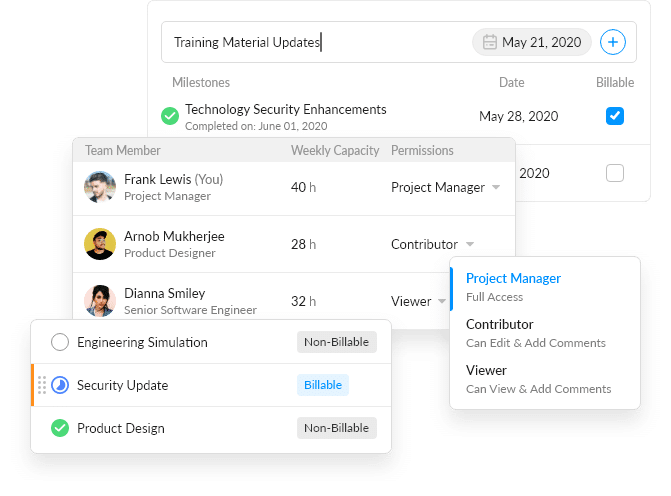
Editor's ChoiceThe simplest way for agencies, consultants, and service businesses to manage projects, clients, and daily tasks.
nTask
The all-in-one platform to manage your work, teams, and goals with comprehensive project management tools.
Zenkit
The all-in-one solution for successful collaboration, project management, and knowledge sharing.

Focalboard
Open source project management for technical teams to centralize, plan, and track work.

ServiceTitan
The #1 software for commercial and residential trades businesses to manage operations and drive growth.
Essential Features to Look For
Task Structure Flexibility
Lists, boards, timelines, calendars—different views of the same data for different thinking styles and use cases.
Your team includes visual thinkers who need Kanban boards and linear planners who need Gantt charts. A tool that only does one well creates adoption friction.
Dependencies and Relationships
Linking tasks that can't start until others finish, grouping related work, and tracking blockers.
Real projects have complex dependencies. Without them, you're manually tracking 'wait, what's blocking this?' instead of the software doing it.
Workload Visibility
Seeing who has capacity and who's overloaded across projects and time.
Over-allocation is invisible until deadlines slip. Good workload views prevent burnout and enable realistic planning.
Templates and Automation
Reusable project structures and automatic actions (assignment, status changes, notifications).
Repetitive setup is demoralizing and error-prone. Templates encode best practices; automation removes manual busywork.
Reporting and Dashboards
Visual summaries of project health, progress, and team performance.
Leadership needs status without reading every task. Good reporting saves hours of 'can you send me an update?' communication.
Integration Depth
Connections to development tools, documents, communication, and time tracking.
Project management is a hub, not a silo. Poor integration means manual data entry and context scattered across systems.
Pricing & Budget Considerations
Project management pricing typically scales by user count and feature tier. Most tools offer free tiers for small teams, with costs increasing for advanced features like automation, reporting, and portfolio management.
Free/Personal
$0
Individuals or very small teams (under 5) with basic needs
Team/Business
$8-15/user/month
Growing teams needing unlimited projects, guests, and basic automation
Business/Premium
$15-30/user/month
Larger teams needing advanced reporting, portfolio views, and integrations
Enterprise
$30+/user/month
Organizations requiring SSO, advanced security, and dedicated support

How to Choose the Right Project Management Tool
Choosing the right project management tool comes down to understanding your specific situation. Start with your most critical needs—the problems you absolutely must solve. Then consider your budget, your team's technical comfort level, and how this tool will fit with your existing workflow. It's also worth taking advantage of free trials; actually using a tool for a week or two tells you more than any amount of research.
Evaluation Criteria
- Have your actual team try it for 2 weeks on a real project, not a demo scenario
- Test the mobile experience if your team works from phones
- Verify integrations with your specific tools (generic 'integrates with Slack' claims vary in depth)
- Check import/export capabilities—you may need to migrate data in or out
- Evaluate learning curve by watching new users attempt basic tasks
- Review notification controls—overwhelming alerts kill adoption
Common Pitfalls to Avoid
- Choosing based on features you think you'll use 'someday' rather than current needs
- Underestimating change management—the tool is easier than changing habits
- Buying the most powerful option when simpler would suffice
- Ignoring user feedback during trial because 'they'll get used to it'
- Expecting the tool to fix process problems (it won't, it will amplify them)
Implementation Tips
Start with one team or project type, not company-wide rollout. Designate a champion who owns configuration and training. Establish naming conventions and structure before people create chaos. Set a 'go live' date after which email/spreadsheet project tracking is deprecated. Plan for 3-6 months before the system feels natural.
Frequently Asked Questions
What's the difference between Asana, Monday, and ClickUp?
Asana emphasizes simplicity and workflow automation—great for marketing and operations teams. Monday.com offers visual flexibility with a spreadsheet-like feel—popular for diverse use cases. ClickUp tries to be everything (docs, whiteboards, goals) in one platform—powerful but complex. Choose based on your tolerance for features vs. simplicity.
Do we need project management software if we already use Slack?
Slack is communication, not project management. Chat messages scroll away, aren't assigned to people, and lack due dates. You need both: Slack for quick discussions, PM software for tracking work. Most teams integrate them so task updates appear in relevant channels.
Should engineering teams use the same tool as the rest of the company?
Often no. Engineering workflows (sprints, code linking, CI/CD integration) have specific needs that tools like Jira and Linear handle better than general PM tools. The integration question becomes: how do non-engineering teams see engineering work? Many companies use Jira for engineering and Asana/Monday for everyone else, connected via automation.
How do we get people to actually use the new PM tool?
Make it the only source of truth—stop accepting status updates via email or chat. Leadership must use it visibly. Remove friction: single sign-on, mobile apps, Slack integration. Train on their actual work, not generic examples. Accept 3-4 weeks of lower productivity during transition. Celebrate small wins publicly.
Related Categories
Ready to Find Your Perfect Project Management Tool?
Compare features, read reviews, and see how each tool stacks up against the competition.