Pool Brain vs ServiceFusion: Pricing and Ratings Compared (2026)
Entry prices and free plans as read on each vendor's pricing page, and user ratings as published on review sites, for Pool Brain and ServiceFusion side by side. This page compares data; it is not a hands-on review.
On the data: On the data below, Pool Brain leads on higher user rating and a free plan. We do not name an overall winner for this pair.
Short on time? Here's the quick answer
Based on published vendor pricing and features and on public review data, here's who should pick what:
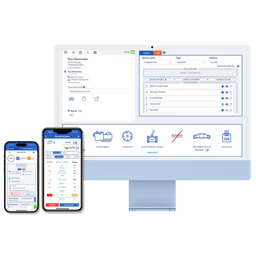
Pool Brain
Optimize pool company operations with an all-in-one software solution for service, billing, and team management.
Best for you if:
- • You want a free tier before you commit

ServiceFusion
Streamline field service operations from scheduling to payments with an all-in-one solution.
Best for you if:
- • You want simplifies and automates business processes
| At a Glance | Pool Brain | ServiceFusion |
|---|---|---|
Starts at | Free plan | From $208/mo, billed monthly Starter plan |
Category | Field Management Invoicing | Field Management CRM |
Rating | 4.9/5 Capterra 4.9 27 reviews | 4.2/5 Capterra 4.3 · G2 4.1 432 reviews |
Free plan | Yes | No |
Choose Pool Brain or ServiceFusion?
Choose Pool Brain if
- You want a free tier before you commit
- You want significantly reduces manual administrative tasks through extensive automation
- You want improves service consistency and quality with guided workflows and custom alerts
Choose ServiceFusion if
- You want simplifies and automates business processes
- You want enhances work-life balance for business owners
In-Depth Analysis
Pool Brain
Optimize pool company operations with an all-in-one software solution for service, billing, and team management.
Pool Brain's pricing is quite fair and transparent, especially with a free Base Plan for unlimited office users.
Strengths
- Pro: Significantly reduces manual administrative tasks through extensive automation.
- Pro: Improves service consistency and quality with guided workflows and custom alerts.
- Pro: Enhances technician efficiency and reduces training time with an intuitive, offline-capable app.
- Pro: Provides detailed financial insights with route profit reports and automated chemical cost tracking.
- Pro: Boosts customer satisfaction and retention through proactive issue detection and transparent communication.
Weaknesses
- Con: Pricing model is per technician, which may scale costs for larger teams.
Key features
ServiceFusion
Streamline field service operations from scheduling to payments with an all-in-one solution.
ServiceFusion's pricing, starting at $208/month for the Starter tier, appears to be on the higher side compared to some competitors, especially for smaller field service businesses.
Strengths
- Pro: Simplifies and automates business processes
- Pro: Enhances work-life balance for business owners
- Pro: User-friendly and customizable to fit company needs
- Pro: Streamlines scheduling, dispatch, and service completion
- Pro: Improves efficiency and profitability
Weaknesses
- Con: The Android mobile app is consistently rated poorly, around 2.7 out of 5 on Google Play, with users reporting crashes during job updates that lose entered data, photos that fail to upload on weaker connections, and noticeable battery drain over a full workday.
- Con: The mobile app has no offline mode and requires an active internet connection for every function, which strands field technicians working in rural areas, basements, or other dead zones.
- Con: Built-in reporting is limited and awkward to use, and the platform integrates poorly with outside tools, forcing some teams to bolt on separate apps for basic needs like tracking time per job.
- Con: Customer support is frequently described as slow and unresponsive, and admins face reduced functionality on mobile such as limited invoice editing compared to the desktop version.
Key features
Plans and prices: Pool Brain vs ServiceFusion
| Tool | Plans and prices | Source |
|---|---|---|
| Pool Brain |
| poolbrain.com/pricing |
| ServiceFusion |
| servicefusion.com/pricing read Nov 1, 2026 |
Prices as read on each vendor's own pricing page on the date shown. Plans are listed per tool and are not matched against the other tool's plans: a plan name or price in one column says nothing about the same row in the other. Details on Pool Brain pricing and ServiceFusion pricing.
Key Takeaways
Pool Brain
- Higher user rating: 4.9/5 vs 4.2/5
- Has a free plan
ServiceFusion
- Choose if you want streamline field service operations from scheduling to payments with an all-in-one solution
What the data shows
On the data below, Pool Brain leads on higher user rating and a free plan. We do not name an overall winner for this pair.
- Pool Brain has the higher user rating (4.9/5 from 27 reviews for Pool Brain, 4.2/5 from 432 reviews for ServiceFusion).
- ServiceFusion starts at $208/mo, billed monthly; Pool Brain has no public paid plan price on file.
- Only Pool Brain has a free plan.
Criteria: user rating (only above 20 reviews on both sides, gap of 0.2 or more), entry price (only on the same billing basis), free plan. How we rate
Frequently Asked Questions
How do Pool Brain and ServiceFusion compare in 2026?
On the data below, Pool Brain leads on higher user rating and a free plan. We do not name an overall winner for this pair. Pool Brain has the higher user rating (4.9/5 from 27 reviews for Pool Brain, 4.2/5 from 432 reviews for ServiceFusion). ServiceFusion starts at $208/mo, billed monthly; Pool Brain has no public paid plan price on file. Only Pool Brain has a free plan.
What are Pool Brain and ServiceFusion used for?
Pool Brain: Optimize pool company operations with an all-in-one software solution for service, billing, and team management. ServiceFusion: Streamline field service operations from scheduling to payments with an all-in-one solution.
What does Pool Brain cost vs ServiceFusion?
Pool Brain has no public paid-plan price on file. ServiceFusion's cheapest paid plan is Starter at $208/mo, billed monthly. Prices read on the vendors' pricing pages, latest check Nov 1, 2026.
What's the main difference between Pool Brain and ServiceFusion?
Pool Brain's main strength: significantly reduces manual administrative tasks through extensive automation. ServiceFusion's main strength: simplifies and automates business processes.