rivva
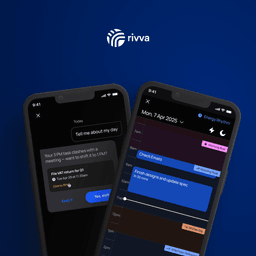
Claim this toolAI Productivity Assistant Syncing Work & Energy, planning your day around your focus level.
From $10.50/mo, free trial Visit WebsiteThe Bottom Line
- Price
- From $10.50/mo, free trial. Compare plans
Key facts
- Schedules tasks and meetings based on your energy levels for optimal focus.
- Consolidates tasks from email and manual input into one AI-orchestrated workspace.
- Adapts your daily plan instantly to changes in your schedule and workload.
Pros
- Optimizes productivity by aligning tasks with peak energy levels.
- Reduces cognitive overload by centralizing tasks and automating prioritization.
- Adapts dynamically to schedule changes, maintaining a realistic plan.
- Helps identify and schedule forgotten tasks from emails.
- Supports neurodivergent professionals by adapting to different working styles.
Cons
- Requires integration with wearables for full energy insight functionality.
- No free tier available, only a 7-day free trial.
- Primarily focused on individual productivity, may not be suitable for complex team project management.
What is rivva?
Available on: Web, iOS, Android, macOS, Windows
Ratings Across the Web
rivva holds an aggregate rating of 4.4 out of 5 from 140 reviews across G2 and Capterra, last checked October 12, 2026.
Ratings aggregated from independent review platforms. Learn more
Key Features
- Energy-based task scheduling
- Automatic task extraction from emails
- AI assistant (Nia) for task management and scheduling
- Unified calendar view for tasks and meetings
- Wearable integration (Apple Health) for energy insights
- Task prioritization and auto-scheduling
- Instant schedule rebalancing
- Two-way Google Calendar sync
Pricing Plans
Free TrialPricing checked Oct 6, 2026. Source: rivva.app/pricing, read Oct 6, 2026
| Plan | Price | Details |
|---|---|---|
| Monthly | $13.99 / month |
+10 more Show less
|
| Quarterly | $31.50 / quarter |
|
Is rivva worth the price?
The pricing for Rivva is on the higher side for a personal productivity tool, especially the Monthly plan at $13.99.
The Quarterly plan offers a slight discount at an effective $10.50/month, but it's still a premium. This pricing might be fair for individuals who heavily rely on advanced, AI-driven scheduling and energy management features.
How rivva's pricing compares
At $10.50/mo, rivva is mid-range of its 4 comparable direct competitors ($2.79 to $12/mo across the set).
Entry paid plan, monthly price. Pricing checked Oct 6, 2026.
rivva by the numbers
Toolradar data: rivva's entry paid plan ($10.50/mo) ranks #18 of 35 for price among the Calendar tools with a verified entry price and no stated unit, where the median is $10.50/mo. As of Oct 2026.
| Metric | rivva | Peer median | Position (1 is best) |
|---|---|---|---|
| Entry paid plan | $10.50/mo | $10.50/mo | #18 of 35 tools with no stated price unit, verified price |
| Free plan | No | 64% have one | n/a |
| User rating | 4.4/5 (across the web, 140 ratings) | 4.6/5 | #30 of 39 tools with 20+ reviews |
Each position is counted among the tools that have data for that row, as noted under it. A lower entry price ranks higher; prices are read on vendor pages and compared only with tools priced on the same basis. All Calendar data · How we compute this. Advertising and placement fees are not inputs to any position.
Cite this: Toolradar, “rivva by the numbers”, Oct 2026.
Reviews

Review rivva, get a free AI guide
Share your experience and we will send you Improve Your Thinking Patterns Using ChatGPT, free.
Across 140 verified user reviews on G2, Capterra
Add your hands-on experience using the offer above to help the next buyer.
Best rivva Alternatives
Top alternatives based on features, pricing, and user needs.


Still deciding?
Most buyers shortlist 2 or 3 tools before committing. Pull a side-by-side comparison or browse the full alternatives shortlist below.
Explore More
rivva FAQ
How does rivva help users manage their daily tasks and energy levels?
Which teams or individuals benefit most from using rivva?
How does rivva compare to a tool like Motion?
What kind of integrations does rivva offer to enhance its scheduling capabilities?
What are the main limitations a user might encounter with rivva?
How is rivva priced?
How does rivva pricing compare with other Calendar tools?
Source: rivva.app