For a 15-person team in one location, Sling's Free plan and ZoomShift Essentials both publish a zero subscription price within their team limits. They are not identical: Sling lists free scheduling for up to 30 users, while ZoomShift limits its free plan to 20 users, one location and schedules two weeks ahead. Homebase Basic is free for one location with up to 10 employees. When I Work starts at $2.50 per user per month for a single location; Deputy Lite lists $5 per user with a $30 monthly minimum on monthly plans.
Eight scheduling products compared on team-size limits, billing units and the features that can require an upgrade.
Some links on this page are affiliate links: if you sign up through one, Toolradar may earn a commission. Commissions never change our ranking or what we write. How we make money
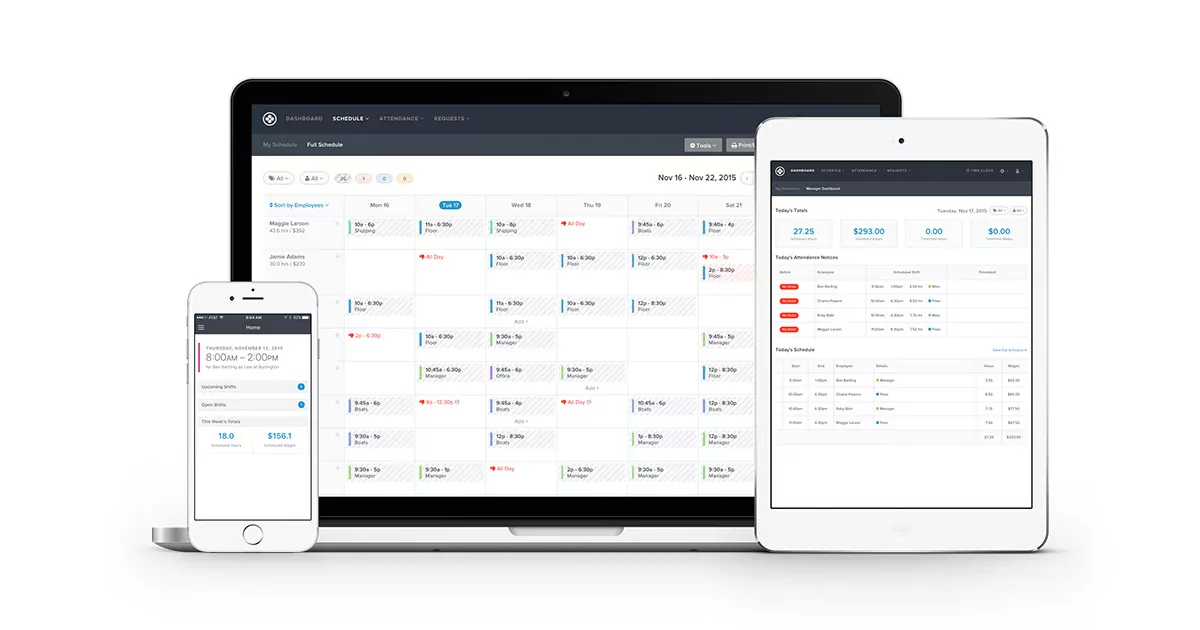
The cheapest schedule is the one that fits the number of people, locations and weeks you actually need. A free schedule can be adequate for a single shop but require an upgrade when an eleventh employee joins, a second location opens or the manager needs a time clock.
Toolradar data: our time tracking category contains 121 products across the wider market. It includes more than shift scheduling, and the count is not a survey of these eight picks. Our methodology compared vendor-published pricing, billing units and basic scheduling limits on October 30, 2026. We did not run hands-on trials, and paid placement did not determine the ranking.
Our reference case is one location with 15 people who all need access, including managers. A free subscription is not the same as a full workforce suite: check time clocks, payroll, reporting, onboarding and messaging separately. Paid examples exclude tax, setup fees and optional services unless stated.
Top Picks
Selected by comparing public prices, scheduling limits and fit for small teams. How we rate

Shift scheduling with a free tier for small teams.
Starting price
Free for up to 30 users
4.4 (88 reviews)
Best for
A team of up to 30 users that needs a schedule and time-off requests.

Schedules and team communication for hourly teams.
Starting price
Essentials free up to 20 users
4.6 (161 reviews)
Best for
A single-location team that can plan within the free tier's two-week window.

Scheduling and time tracking priced by location.
Starting price
Basic free for up to 10 employees
4.0 (907 reviews)
Best for
A small single-location shop comparing an employee cap with a location-based paid plan.
| Tool | Starting price | Rating | Best for |
|---|---|---|---|
| Sling Visit Sling website | Free for up to 30 users | 4.4 88 reviews | Best for: A team of up to 30 users that needs a schedule and time-off requests. |
| ZoomShift Visit ZoomShift website | Essentials free up to 20 users | 4.6 161 reviews | Best for: A single-location team that can plan within the free tier's two-week window. |
| Homebase Visit Homebase website | Basic free for up to 10 employees | 4.0 907 reviews | Best for: A small single-location shop comparing an employee cap with a location-based paid plan. |
| When I Work Visit When I Work website | From $2.50/user/mo | 4.3 1,736 reviews | Best for: A single-location business that prefers a per-user starting rate. |
| Deputy Visit Deputy website | Lite from $5/user/mo shown | 4.5 1,506 reviews | Best for: A team that wants scheduling and timesheets and can budget for a monthly minimum. |
| Connecteam Visit Connecteam website | Operations Basic from $29/mo shown | 4.6 3,613 reviews | Best for: A team comparing a bundled operations hub and its user allowance. |
| 7shifts Visit 7shifts website | Check current plan pricing | 4.0 1,612 reviews | Best for: A restaurant comparing schedules alongside its existing tip and payroll workflows. |
| Humanity Schedule Visit Humanity Schedule website | Request pricing | 4.0 1,223 reviews | Best for: A larger or more complex operation requesting a workforce scheduling quote. |
- Starting price
- Free for up to 30 users
- Free plan
- Yes
- Rating
- 4.4 (88 reviews)
Best for: A team of up to 30 users that needs a schedule and time-off requests.
- Pro: The free tier lists shift scheduling and time-off requests.
- Pro: Long-term scheduling is listed on Free.
- Pro: Its pricing page describes open shifts and messages.
- Con: The free user limit matters as the team grows.
- Con: Mobile time tracking is listed on Premium; verify the exact workflow.
- Starting price
- Essentials free up to 20 users
- Free plan
- Yes
- Rating
- 4.6 (161 reviews)
Best for: A single-location team that can plan within the free tier's two-week window.
- Pro: Essentials lists a free allowance for 20 users.
- Pro: The free tier includes scheduling and team communication.
- Pro: Starter lists timesheets and shift swaps.
- Con: The free tier is limited to one location and two weeks ahead.
- Con: Managers also count toward active team member spots.
Homebase
Scheduling and time tracking priced by location.
- 4.6 on G2 (594 reviews)
- 3.3 on Trustpilot (313 reviews)
- Starting price
- Basic free for up to 10 employees
- Free plan
- Yes
- Rating
- 4.0 (907 reviews)
Best for: A small single-location shop comparing an employee cap with a location-based paid plan.
- Pro: Basic lists scheduling and time tracking.
- Pro: Essentials lists unlimited employees at a location.
- Pro: The vendor lists payroll as a separate add-on.
- Con: Basic is limited to one location and 10 employees.
- Con: Confirm the selected billing period and payroll charges.

When I Work
Shift scheduling and team communication billed by user.
- 4.5 on Capterra (1,300 reviews)
- 4.4 on G2 (406 reviews)
- 3.7 on TrustRadius (25 reviews)
- Starting price
- From $2.50/user/mo
- Free plan
- No
- Rating
- 4.3 (1,736 reviews)
Best for: A single-location business that prefers a per-user starting rate.
- Pro: The pricing page publishes a single-location starting rate.
- Pro: Scheduling and team messaging are listed.
- Pro: The platform describes time and attendance tools.
- Con: The multi-location starting rate differs.
- Con: Confirm time-tracking options and billing terms before subscribing.

Deputy
Workforce scheduling and time tracking with a stated invoice minimum.
- 4.6 on Capterra (773 reviews)
- 4.6 on G2 (666 reviews)
- 4.3 on SourceForge (67 reviews)
- Starting price
- Lite from $5/user/mo shown
- Free plan
- No
- Rating
- 4.5 (1,506 reviews)
Best for: A team that wants scheduling and timesheets and can budget for a monthly minimum.
- Pro: Lite lists basic scheduling and timesheets.
- Pro: Shift swaps and leave management are described.
- Pro: The vendor publishes its minimum monthly spend.
- Con: Monthly Lite, Core and Pro invoices have a minimum.
- Con: Managers and administrators count as users.
Connecteam
Operations hub with scheduling and time tracking.
- 4.6 on G2 (3,505 reviews)
- 4.7 on Trustpilot (108 reviews)
- Starting price
- Operations Basic from $29/mo shown
- Free plan
- Yes
- Rating
- 4.6 (3,613 reviews)
Best for: A team comparing a bundled operations hub and its user allowance.
- Pro: Operations Basic lists scheduling and clock-in.
- Pro: Its displayed plan includes the first 30 users.
- Pro: The pricing table describes additional-user charges.
- Con: Annual and monthly amounts differ; confirm the billing selection.
- Con: Communications and HR are separate hubs with their own plans.

7shifts
Restaurant-focused scheduling and team operations.
- 4.7 on Capterra (1,212 reviews)
- 2.8 on Trustpilot (271 reviews)
- 4.5 on G2 (129 reviews)
- Starting price
- Check current plan pricing
- Free plan
- Yes
- Rating
- 4.0 (1,612 reviews)
Best for: A restaurant comparing schedules alongside its existing tip and payroll workflows.
- Pro: The vendor describes employee scheduling and time clocking.
- Pro: Restaurant-focused workflows include tip management.
- Pro: The platform also lists team communications.
- Con: Confirm current plan limits and pricing for your location.
- Con: Payroll and tips may have separate charges.
Humanity Schedule
Frontline shift scheduling from TCP Software.
- 4.3 on G2 (951 reviews)
- 4.3 on Capterra (144 reviews)
- 4.3 on SourceForge (67 reviews)
- Starting price
- Request pricing
- Free plan
- No
- Rating
- 4.0 (1,223 reviews)
Best for: A larger or more complex operation requesting a workforce scheduling quote.
- Pro: The vendor describes shift planning and labor budgeting.
- Pro: It lists mobile access and compliance features.
- Pro: Demand-based scheduling is part of the product description.
- Con: Request a quote for the exact user count and configuration.
- Con: The broader product may exceed a very small team's needs.
Other Time Tracking tools worth considering
More published tools from our Time Tracking category, ordered by our category ranking. They are not part of the editorial picks above.














What employee scheduling software does
A shift scheduler lets a manager assign people to work periods and share those assignments. Depending on the plan, staff can submit availability, request time off or ask a colleague to cover a shift. Some products add clock-in, timesheets, labor budgets and payroll integrations.
A booking calendar designed for customers is a different product. If the problem is recording hours rather than assigning shifts, compare time tracking software as well. A schedule and an approved timesheet may disagree, so a business that pays from hours worked should test both steps.
The free limit changes the comparison
For our 15-person, one-location example, Sling's stated 30-user free allowance and ZoomShift's 20-user free allowance both cover the team. The scheduling windows and features differ: ZoomShift Essentials lists a two-week planning window and one location, while Sling lists longer-term scheduling. Test the required workflow before relying on either free tier.
Homebase Basic covers up to 10 employees at one location, so this example needs a different plan. Its pricing page displays Essentials at $30 per location per month for unlimited employees; confirm the billing toggle and final charge. At When I Work's published single-location starting rate, multiplying the rate by 15 gives $37.50 per month before add-ons. This is not a quote: confirm minimum spend and the billing period. Deputy Lite at its listed rate would be $75 for 15 users before tax; its monthly minimum matters for a smaller team. These products and plan features are not equivalent.
Key Features to Look For
Billable people (Essential)
Count owners, supervisors and workers who need access. Ask whether inactive or seasonal staff affect the bill.
Locations (Essential)
A free tier may cover only one location. Check whether a worker assigned to two sites needs separate access.
Planning window (Essential)
Test how far ahead a manager can create and publish shifts before the team hits a plan limit.
Availability and time off (Essential)
Create an absence and check whether managers see conflicts while assigning the schedule.
Shift swaps (Essential)
Check how an employee requests cover and whether a manager must approve the replacement.
Time clock (Important)
Confirm whether clock-in and timesheets are included in the chosen tier or require another plan.
Minimum spend (Important)
A per-user rate may have a monthly invoice minimum, making very small teams more expensive than simple multiplication suggests.
Export and payroll (Important)
Ask for a sample schedule and timesheet export and check any payroll integration or separate payroll fee.
Choose around the point where the plan changes
-
For a team under 10, compare free-user limits and whether the time clock is included.
-
For a second location, confirm whether the plan charges by site or requires an upgrade.
-
For seasonal staffing, ask when a person becomes billable and how to deactivate a user.
-
For a restaurant, compare tip and payroll needs as separate costs rather than assuming they are included in a scheduler.
Evaluation Checklist
Enter a sample week of shifts with your actual number of managers and workers.
Create an absence, swap request and open shift and check the approval flow.
Build a schedule more than two weeks ahead if the business needs one.
Ask the vendor to quote the number of people and locations on monthly and annual billing.
Clock in and export a sample timesheet if payroll depends on recorded hours.
Check cancellation, data export and what happens when a free plan limit is reached.
Pricing Overview
Free schedule
Teams within the stated free-user and location limits that can accept the included feature set.
$0 subscription
Per-user plans
A team that wants to scale the subscription with its user count and has checked minimum spend.
From $2.50 per user/month in the When I Work example
Per-location plan
A business comparing a location-based price with a per-user alternative.
Homebase Essentials displays $30/location/month
Pricing Comparison
| Product | Published starting point | Limit or billing condition |
|---|---|---|
Sling Free | $0 | Up to 30 users; check which time tools require Premium |
ZoomShift Essentials | $0 | Up to 20 users, one location, schedules two weeks ahead |
Homebase Basic | $0 | One location, up to 10 employees |
Homebase Essentials | $30/location/month shown | Unlimited employees; confirm billing option |
When I Work Essentials | $2.50/user/month starting rate | Single-location teams; check add-ons and billing |
Deputy Lite | $5/user/month shown | Monthly plans have an invoice minimum; taxes excluded |
Connecteam Operations Basic | $29/month shown for first 30 users | Yearly option displayed alongside a monthly option; confirm checkout |
Check current pricing | Restaurant-focused; verify limits and plan | |
Request pricing | Confirm users, locations and implementation |
Vendor prices and limits checked October 30, 2026: Sling, ZoomShift, Homebase, When I Work, Deputy, Connecteam, 7shifts and Humanity Schedule. Check the current offer and billing terms before purchasing.
Mistakes to Avoid
- ×
Counting employees but forgetting managers who need access.
- ×
Treating a trial as a permanent free plan.
- ×
Comparing a per-location price to a per-user price without multiplying it.
- ×
Ignoring the scheduling window or the cost of a second site.
- ×
Assuming payroll and time tracking are included in every scheduling tier.
Expert Tips
- →
Price both your current headcount and a busy-season headcount.
- →
Ask for a written quote with the billing frequency and user definition.
- →
Test one real scheduling cycle with fictional employee data.
- →
Check who approves shift swaps and time-off conflicts.
- →
Export a sample timesheet before linking payroll.
Red Flags to Watch For
-
A free offer that does not state its user or location limit.
-
A per-user calculation that omits a published minimum spend.
-
A demonstration that cannot show how staff receive changed shifts.
-
Unclear cancellation or data-export terms.
-
A price comparison that treats plans with different features as identical.
The Bottom Line
For a 15-person team in one location, start with Sling Free and ZoomShift Essentials and compare planning windows and time-clock requirements. Homebase's free tier fits a smaller one-location team, while its paid plans use a location-based price.
When I Work and Deputy offer published per-user starting points. Connecteam bundles scheduling inside its Operations hub; 7shifts and Humanity merit a closer look when restaurant or complex workforce needs matter. Compare time tracking tools, cheapest time tracking and appointment scheduling for adjacent needs.
Frequently Asked Questions
What is the cheapest employee scheduling software?
Sling and ZoomShift publish free scheduling plans within their stated limits. The cheapest suitable option depends on team size, locations, planning window and whether a time clock is needed.
Can 15 employees use a free schedule?
Sling lists free scheduling for up to 30 users; ZoomShift Essentials lists up to 20 users at one location with scheduling two weeks ahead. Check required features and current terms.
Is Homebase free for more than 10 employees?
Homebase Basic is listed for one location with up to 10 employees. Its Essentials plan lists unlimited employees per location; confirm the billing option and current charge.
Do managers count toward user limits?
They can. Deputy says administrators and supervisors are counted as users, and ZoomShift includes managers in active team member spots. Ask each vendor about its own definition.
Does a per-user price have a minimum?
Sometimes. Deputy says monthly Lite, Core and Pro plans have a $30 minimum per invoice in the United States. Check the current terms and taxes.
Does free scheduling include a time clock?
Not necessarily. Homebase Basic lists basic time tracking; Sling describes mobile time tracking on Premium. Verify the exact plan and clock-in workflow before choosing.
Cite this page: Toolradar, "Cheapest Employee Scheduling Software in 2026: Small-Team Prices", updated November 2026, https://toolradar.com/guides/cheapest-employee-scheduling-software
Spotted an outdated price or a wrong fact? Suggest a correction: we check it against the vendor's own page. Work for one of these vendors? Claim your listing to update it yourself.
Same topic on Toolradar
- In-depth guide: Best Employee Scheduling Software
Related Guides
Ready to Choose?
Compare features, read reviews, and find the right tool.
Some offers on this page may be paid placements or contain affiliate links.